• Evie Finch @ewie
    March 14, 2024 at 1:51 am

    Brasília Government Grid

    (This card is interactive! Click or tap on it!)

    ★
    ★
    ★
    ★
    ★

    Upgrade: Region. Trash: 3

    Whenever you rez a piece of ice during a run against this server, you may derez another installed piece of ice. If you do, the rezzed ice gets +3 strength for the remainder of that run. Use this ability only once per turn.
    Limit 1 region per server.

    4 stars

    HB has a decent number of ice you’d want to rez multiple times that currently see play, like the harmonic ice and Magnet and probably some other cards I’m forgetting. Brasília makes them better. Given that I’ve seen some decks that are already willing to try to fish them out of the trash to play them again, I feel fine saying that any deck that’d run those cards will also want to run this card. Also, note that you’re able to derez ice at any (relevant) point in the run, meaning that you can derez ice that’s already been passed so you can put off paying for it later, or derez your big scary on rez card that the runner will deal with next. That’ll make the think twice before continuing the run. The trash cost is also nice since it’ll make Brasília stick around. That's always good.

    < Prev|Home|Next >
    1. #netrunner
    2. #netrunner scoops
    3. #evie reviews netrunner
    4. #evie reviews liberation
    5. #css crimes
    6. #interactable
    7. #cohost archive

    View Comments
  • Evie Finch @ewie
    March 13, 2024 at 4:58 am

    Lightning Laboratory

    click on the card btw

    ★
    ★
    ★
    ★
    ★

    My main opinion on agendas are that how good an agenda is is dictated more by how much it costs, not its card text. Since agendas are your main win condition, every extra bit of cost also increases the odds that all your work will be in vain and the card will get stolen. This leads me to Lightning Laboratory, which is a 4 for 2 with a pretty decent bit of card text on it, although it’s a bit slower and more reactive, which I don’t like out of a card. Do I think it’ll see play? In the right deck, sure. But I don’t see people clamoring to cram it into their decks right now.

    < Prev|Home|Next >
    1. #netrunner
    2. #netrunner scoops
    3. #evie reviews netrunner
    4. #evie reviews liberation
    5. #this is my first year of netrunner btw so my reviews might be bad
    6. #css crimes
    7. #interactable
    8. #cohost archive

    View Comments
  • Evie Finch @ewie
    November 17, 2022 at 8:01 am

    now introducing: threads in cohost

    okay so thanks to the power of @blep’s Prechoster, i’ve decided to introduce threads in cohost! yep! they’re here now! sorry @staff i already did it for you :P


    evie @ewie A little bit later

    now y’all might be thinking “threads in cohost, evie? that sounds stupid!” and i can assure you they are! they’re awful and nobody should try to bring features from twitter over to cohost! but i still did it because i make the internet worse just by being here


    evie @ewie A little bit later

    it supports both html and markdown input, and uses the horizontal rule as a way to separate posts in threads, why the horizontal rule? because that’s basically how you’d do it without threads in cohost anyways lol. at least in terms of vibes i mean


    evie @ewie A little bit later

    i mean it only kinda supports markdown, the minifier does break the markdown sorta but it does make where the markdown is kinda obvious so you can easily fix it with some minor editing, which is pretty solid!


    evie @ewie A little bit later

    idk you can find the link to it over here:

    https://gist.github.com/qt-dork/3d5047d799521cecafc5cdce2987932d

    so please like stick it in prechoster and make your own threads!


    evie @ewie A little bit later

    i hope y’all like them because i cannot undo the monstrosity i have created. also sorry if i’m kinda off the wall i’m really tired and i need to sleep it’s like 2 am


    evie @ewie A little bit later

    also for the love of god write your posts outside of prechoster i’ve used too much power to make this and now it kinda lags every time you type. i’m gonna blame it on using preact or something idk. i used obsidian to write this instead of prechoster


    evie @ewie A little bit later

    idk how accessible this is. i did some light testing with voiceover and i don’t see any issues? but lemme know if something is really bad that i should fix

    1. #css
    2. #css crimes
    3. #twitter thread
    4. #The Cohost Global Feed
    5. #prechoster
    6. #cohost archive

    View Comments
  • Evie Finch @ewie
    November 8, 2022 at 8:50 am

    Accessible fancy text for all

    I'm gonna be honest, I'm not a particularly huge fan of people doing fancy text like this:

    𝒪𝑜𝑜𝒽 𝓁𝑜𝑜𝓀 𝒶𝓉 𝓉𝒽𝒾𝓈 𝒻𝒶𝓃𝒸𝓎 𝓉𝑒𝓍𝓉 𝒶𝓇𝑒𝓃'𝓉 𝐼 𝓈𝑜 𝒻𝒶𝓃𝒸𝓎 Oooh look at this fancy text aren't I so fancy

    Or some, like, homestuck typing quirk-ass text like this:

    GC: OBJ3CT1ON!!! GC: Objection!!!

    I think it's hard to read, it's hard to make sense of, and honestly I think it's also kinda annoying. But, I understand that for some people, it's how they want to (or need to) express themselves. And as someone who's a bit of a big fan of accessibility, I'd like to give people the choice to do what they want, but in a way that's not going to completely heck over people using screen readers.

    So, I'd like introduce Accessible fancy text 🎉!!!

    Below is a snippet you can use in your cohost posts (chosts) to make sure that if you use fancy text (which I wouldn't recommend using in general but still), it'll still be readable to screen readers. Below the fold is a writeup about it that goes into more detail.

    The Snippet

    <!-- use div, p, span, whatever works here -->
    <div aria-describedby="user-content-id-name">
    	<span aria-hidden="true"> <!-- Put your stuff here! --> </span>
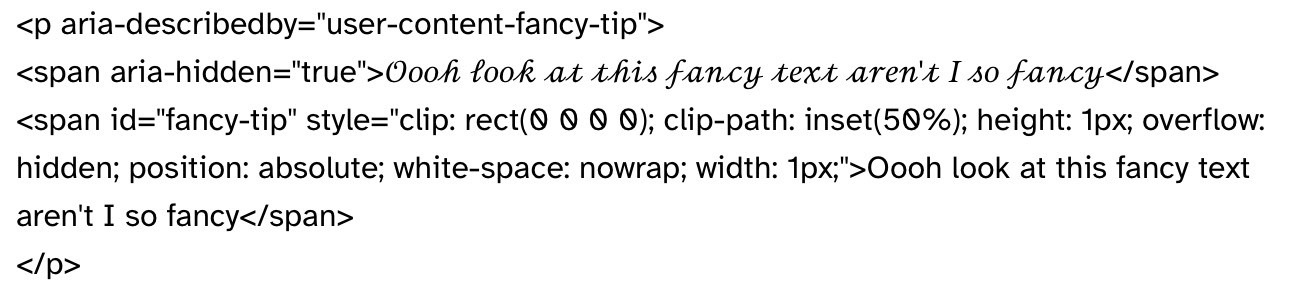
    	<span id="id-name" style="clip: rect(0 0 0 0); clip-path: inset(50%); height: 1px; overflow: hidden; position: absolute; white-space: nowrap; width: 1px;">Rewrite the stuff but in human-readable text</span>
    </div>
    

    It also works 𝓲𝓷𝓵𝓲𝓷𝓮 inline too!


    Alright, so how does it work?

    So, the main magic bullet here is aria-describedby. All it basically does is say to the screen reader, "hey, this chunk of html has another element describing it." Sort of in the same way that adding alt text to an image works I guess. There is a catch, though. Unlike alt text, aria-describedby doesn't actually hide (to the screen reader) what it's describing, which is fine. I can't really think of any reasons off the top of my head not to hide it, but I'm certain there's some good reasons. In practice, we can use aria-describedby like this (graciously stolen from this writeup by @thrice-totted):

    • Put the description in an element with id="{something}" on it
    • Set aria-describedby="user-content-{something}" on the element it's describing. (We stick it on a wrapper around both elements instead. I'm not certain if it's better, but I've had less issues with this over having them side by side when I did some testing.)

    The reason we need to stick "user-content" in front of the id we want to use for our element is because cohost actually lets us use custom ids in our posts, but it'll prepend them with "user-content" to make sure they never interfere with any actual ids used by the website.

    Since aria-describedby doesn't hide our fancy text from the screen reader, we'll want to manually hide it ourselves, or else the screen reader user could end up having to sit through this entertaining listening experience. So what we'll want to do is make sure to wrap the actual element with the fancy text in it with aria-hidden="true", which ensures that screen readers just assume it doesn't exist.

    After that, we stick some css on the aria-describedby element to make it invisible so people who can see don't end up getting double text. (I'd rather prefer to have a little tooltip that shows the text, so that way you could hover over or tap the fancy text and read what it actually means, but I couldn't find anything accessible that doesn't use javascript. If anyone in the comments can figure it out, then please let me know and I'll update the post.)

    clip: rect(0 0 0 0); 
    clip-path: inset(50%);
    height: 1px;
    overflow: hidden;
    position: absolute;
    white-space: nowrap; 
    width: 1px;
    

    (For convenience's sake, here's how you'd put it in an html element)

    <span style="clip: rect(0 0 0 0); clip-path: inset(50%); height: 1px; overflow: hidden; position: absolute; white-space: nowrap; width: 1px;"</span>
    

    Just as one last thing, I'll add that just like the accessible css crime pioneers before me, I don't rely on accessibility tools myself. I made sure to test all this stuff with Voiceover on my computer before putting it out there, but I don't use it on a daily basis. I'm just a weird nerd that saw the incredibly minor drama about fancy text on cohost earlier today (as well as the post resolving it), and thought "Oh there's gotta be a really simple solution". And there was! So that's good. Glad we got that sorted out and we're able to use the power of html to make our text accessible. It'd be awful if there was a social media website where people had to just constantly complain about how people should never use fancy text while other people ignored the wishes of people just seeking to improve accessibility.

    I think I've got it, so I should just use this willy nilly now that I can guarantee my stuff'll be accessible?

    I mean, no??? No matter what, using plain text should always be preferred over fancy text, since that's accessible by default. I mostly put this out there since I know that no matter what, there'll be some people who have some reason to not use plain text, and so they should, at the very least, make it accessible. But as a rule of thumb, you should always prefer to have your text look like this

    Plain text reading "Ooh look at this fancy text aren't I so fancy"

    Over this

    An accessible fancy text block that reads "Ooh look at this fancy text aren't I so fancy". It is harder to read at a glance than the plain text.

    At the very least, it'll be easier for you to read when you're writing the post.

    1. #accessibility
    2. #html
    3. #css crimes
    4. #The Cohost Global Feed
    5. #cohost archive

    View Comments
( 1 of 1 )